Polycam Floorplan Editor (Beta) - Now Available
We're excited to announce the Floorplan Editor is now available to select beta testers on Business and Enterprise plans (iOS and Web).
What It Does:Transform your Space Mode and Floorplan captures into polished, professional floorplans with full editing capabilities.
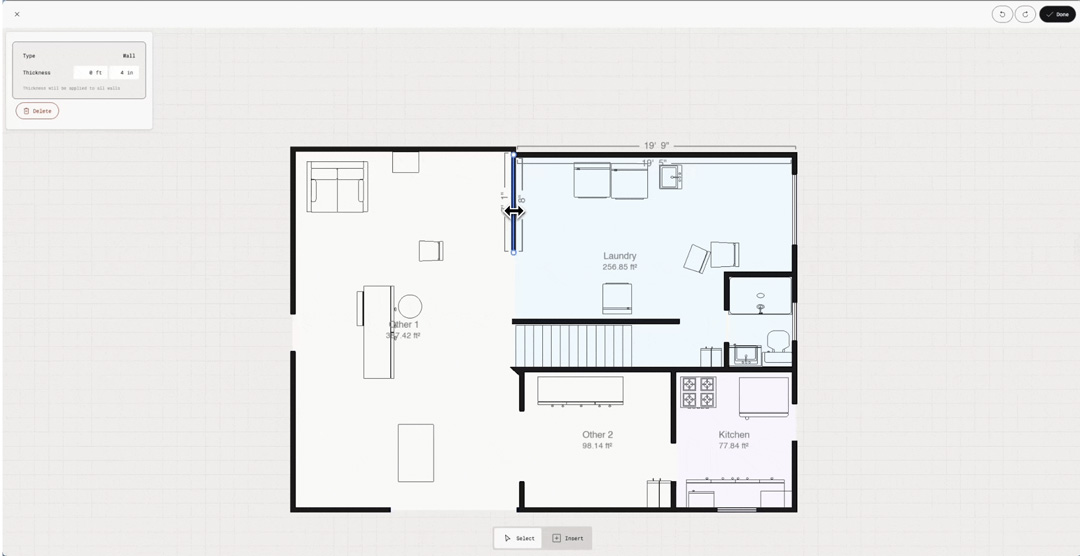
Key Features:
- Edit Walls: Straighten curved walls, adjust positioning, resize lengths, and modify thickness
- Add Room Labels: Clearly identify spaces (Kitchen, Bedroom, Living Room, etc.)
- Manage Openings: Add, move, resize, or replace doors and windows from the Asset Library
- Refine Furniture: Move, rotate, resize, replace, or remove detected furniture
- Asset Library: Insert from 70+ furniture and fixture assets across 10+ categories (Bathroom, Kitchen, Office, Lighting, etc.)
- Auto-sync: Changes save across all devices and automatically update your 3D floorplan and Spatial Report
Getting Started: Capture a space using Space Mode (with floorplan enabled) or Floorplan Mode. Once processed, access the Floorplan Editor to refine your layout. Try our interactive demo to get familiar with the tools before editing your first project.

General Updates
🛠️ Changes
If you are on an active team, that team now shows as the default workspace when you open the app or browser.

🐞 Fixes
Team management: Corrected a discrepancy in team member count and type (iOS, Web)
Volume Tool is available for Business and Enterprise teams.
Measure your 3D model in one, two, or three dimensions.
Volume Measure turns both scans and uploaded models into actionable data with up to 99% accurate results. You can use it to measure both enclosed areas, such as mounds or containers, and open spaces like swimming pools.
Learn more about the Volume tool and how to use it in our Help Center
Non-LiDAR Space Mode is now available for iOS devices.
Space Mode captures detailed 3D models of your spaces using your device's camera. Perfect for iOS devices without LiDAR sensors.
Important Note: Floorplan generation (both 2D and 3D floorplans) is not currently available for non-LiDAR Space Mode. This mode focuses on creating detailed 3D mesh models of your space
🐞 Bug fixes
Android:
- Fixed an issue that caused the Video player for Learn tutorial to freeze the screen
IOS:
- Fixed a rendering issue that caused the Volume measure tool to appear on top of the capture instead of around it
- Fixed an issue that caused the app to crash for some users


